How to Choose a PoE Switch for IP Camera Systems
Choose a PoE switch for IP camera systems by matching ports, PoE budget, uplinks, cable distance, control needs and future expansion.
By Maxsol Team

A PoE switch for IP camera systems should be selected by the entire surveillance design—not by camera count alone. Start with the number and location of cameras, then verify the switch’s PoE power budget, uplink type, cable runs, control requirements and expansion allowance.
For a small, single-area installation, an 8-port switch may be practical. Larger sites often need a 16-, 24- or 48-port design, particularly when cameras are distributed across buildings, car parks, gates, warehouses or several floors. The right choice leaves spare ports and power capacity without paying for features the site will not use.
Start with camera count and topology
Count every powered endpoint that will connect to the switch. This usually includes IP cameras, but may also include wireless access points, intercoms or other PoE devices on the same network. Do not assume every physical port will be available exclusively for cameras.
Then map the topology:
- Where will cameras be installed? Group cameras by building, floor, perimeter zone or outdoor cabinet.
- Where will the NVR, VMS server or core network sit? This determines the uplink path.
- Will all cameras home-run to one cabinet? A central switch may work well.
- Are cameras spread across a large site? Smaller access switches with fibre or copper uplinks may be easier to install and maintain.
- Will more cameras be added later? Reserve ports for known expansion, replacements and temporary cameras.
A sensible planning rule is to avoid specifying a switch with exactly the same number of PoE ports as the initial camera count. If a site needs eight cameras today, an 8-port PoE switch can work, but it offers no PoE port spare for a ninth camera. Consider the likely growth plan, available rack or cabinet space, and whether another switch would be practical later.
Match the switch size to the camera layout
Port count should reflect how cameras are physically grouped, not only the total project quantity. For example:
- Up to eight nearby cameras: one compact 8-port switch may suit a small office, shop, residence or gate area.
- Nine to 16 cameras in one cabinet: a 16-port switch can simplify cabling and leave more room for additions.
- A 17- to 24-camera zone: a 24-port switch is often more orderly than combining several small units, provided its power budget and uplinks fit the design.
- Large, concentrated deployments: a 48-port switch can reduce the number of access switches, although power, cooling, rack layout and uplink design need closer attention.
For distributed Philippine sites, consider practical factors such as long perimeter runs, separate guardhouses, exposed outdoor enclosures and areas where power is available only at a central point. A larger switch is not automatically better if camera cables must travel too far. In some layouts, placing switches closer to camera groups and linking them back by fibre is the more robust approach.
Calculate the PoE load before choosing a budget
The PoE budget is the total power a switch can deliver across its PoE ports. It is not the same as the number of ports. A 24-port switch may power 24 cameras only if the combined demand stays within the available budget and each port can provide the required power.
Use this planning calculation:
Total PoE load = sum of each device’s maximum power draw
Then allow a margin for startup demand, IR illuminators, heaters, motors, future devices and normal design headroom.
For example, if 12 cameras each have a stated maximum draw of 12W:
12 cameras × 12W = 144W
A switch with a 300W PoE budget has substantial headroom for that stated load. However, if some cameras use powerful infrared lighting, PTZ movement, built-in heaters or other high-draw functions, use their documented maximum wattage rather than an average daytime figure.
What to check in every camera datasheet
Before finalising a PoE switch for IP camera systems, record:
- Maximum power consumption in watts
- Required PoE standard or input type
- Whether the power figure includes IR operation
- PTZ, heater, wiper or illuminator power requirements
- Power demand during boot-up or cold-weather operation, where relevant
- Required power at the camera after cable losses
- Whether other PoE devices will share the switch
Do not multiply the port count by an assumed wattage. A fixed indoor turret camera and an outdoor PTZ camera can have very different power requirements.
Allow power headroom
A switch should not be planned at its theoretical limit under normal operation. Leaving headroom helps accommodate:
- Night-time IR activation
- New cameras added after turnover
- Replacement cameras with a higher PoE requirement
- Access points or intercoms added to the same switch
- Variations in actual power draw
The appropriate margin depends on the project, but the principle is simple: calculate from maximum device demand and keep unused capacity where possible. Confirm both the overall switch budget and any per-port limit against the final camera schedule.
Choose copper and SFP uplinks for the backhaul
PoE ports connect cameras and other edge devices. Uplink ports carry traffic from the switch to the NVR, recording server, core switch or another network segment. Uplink planning matters because multiple camera streams converge there.
A Gigabit uplink can be suitable for many small and medium camera groups, but the actual design depends on stream settings, camera count, bitrate, viewing traffic, recording architecture and future growth. Do not estimate uplink needs from camera resolution alone. Use the configured bitrate or a conservative maximum bitrate for every camera.
When RJ45 copper uplinks make sense
Gigabit RJ45 uplinks are useful when the next network device is nearby and a copper connection is practical. They can simplify installations where the switch, NVR and router or core switch are in the same room, rack or building.
Check the planned cable pathway, separation from electrical interference sources, termination quality and total channel length. For standard Ethernet over twisted-pair copper, design around the usual 100-metre channel limit unless the equipment documentation specifically supports a different operating mode.
When SFP uplinks are the better choice
SFP uplinks are useful where fibre is needed between buildings, across longer site backhauls or in electrically noisy areas. Fibre can also help avoid the earth-potential and surge concerns that may arise with long copper links between structures. The required SFP module type, fibre type, connector, distance rating and network compatibility must all be confirmed separately.
For surveillance sites with remote buildings, perimeter cabinets or wide compounds, an SFP uplink may provide a cleaner backbone design than stretching copper between areas.
Remember that an SFP slot does not automatically mean a module is included or that every module type is compatible. Verify these points during procurement.
Decide whether 300m Extend mode is needed
Use an extended-distance mode only when a camera truly cannot be served by a conventional 100-metre copper channel and the site design supports the mode’s limitations.
The PS1802G includes a 300m Extend mode. The PS11602G also has an Extend mode. Extended-distance operation can be useful for selected perimeter cameras, gate cameras or remote points where installing a closer cabinet or fibre link is difficult. It should not be treated as a substitute for a complete cable and bandwidth plan.
Before relying on an Extend mode, confirm:
- The exact maximum distance supported in the selected mode
- The available data rate at the required distance
- The cable category, conductor quality and installation condition required
- The camera’s actual bitrate and network demand
- The PoE power available at the far end
- Whether the run has joins, poor terminations or exposed sections
- Whether surge protection, grounding and enclosure design are needed for the site
Understand the trade-off
Long-range PoE modes commonly involve a lower data rate than a normal Gigabit link. That can be acceptable for one camera with a carefully controlled bitrate, but it may not suit a high-bitrate camera, multiple cameras through a downstream device or a future expansion plan.
For new construction or major outdoor deployments, fibre to a local switch is often worth evaluating alongside long-range copper. It can provide a clearer path for higher backhaul capacity and future growth. The best approach depends on trenching access, cabinet placement, available power, maintenance needs and the site’s security design.
Compare 8-, 16-, 24- and 48-port PoE switch options
The following comparison uses the verified specifications of four Maxsol switch options. It is a starting point for matching a switch to a camera schedule; it does not replace confirmation of camera compatibility, installation conditions or final network design.
| Model | PoE ports | Uplinks | PoE budget / power detail | Notable verified features | Best fit to evaluate |
|---|---|---|---|---|---|
| PS1802G | 8 Gigabit PoE ports | 2 Gigabit RJ45 uplinks | 120W PoE budget | 300m Extend mode, VLAN isolation, AI PoE watchdog | Small camera groups and compact installations |
| PS11602G | 16 Gigabit PoE ports | 2 Gigabit uplinks | 300W internal power supply | Watchdog, VLAN and Extend modes | Medium camera groups requiring more ports and power headroom |
| PS12402FG | 24 Gigabit PoE ports | 2 Gigabit RJ45 and 2 Gigabit SFP uplinks | 300W budget; up to 30W per PoE port | RJ45 and SFP uplink options | Multi-zone or building-to-building designs needing fibre-capable uplinks |
| PS14802SFG | 48 Gigabit PoE ports | 2 Gigabit SFP uplinks | 400W budget | 100Gbps switching capacity | Higher-density camera installations with fibre backhaul planning |
8-port option: PS1802G
The PS1802G 8-port Gigabit PoE switch with 120W budget provides eight Gigabit PoE ports and two Gigabit RJ45 uplinks. Its 120W PoE budget should be checked against the maximum demand of all connected cameras, including night-time and PTZ loads where applicable.
Its 300m Extend mode may be relevant for selected long camera runs. It also includes VLAN isolation and an AI PoE watchdog. VLAN isolation and a watchdog are useful operational features, but do not assume they provide the same configuration depth as a fully managed switch. Confirm the exact controls required for your project.
16-port option: PS11602G
The PS11602G 16-port Gigabit PoE switch with 300W power supply has 16 Gigabit PoE ports, two Gigabit uplinks and a 300W internal power supply. It includes watchdog, VLAN and Extend modes.
This option is worth evaluating where an 8-port unit would leave too little expansion room or where the camera load calls for a larger power allowance. As with any Extend function, verify the supported distance and operating performance for the intended camera and cable route.
24-port option: PS12402FG
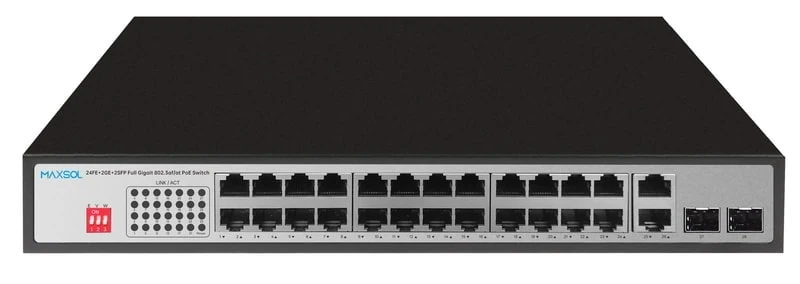
The PS12402FG 24-port Gigabit PoE switch with RJ45 and SFP uplinks has 24 Gigabit PoE ports, two Gigabit RJ45 uplinks and two Gigabit SFP uplinks. It has a 300W PoE budget and supports up to 30W per PoE port.
The additional SFP uplinks make this model relevant to designs that need a fibre-capable connection to another building, a main communications rack or a core switch. Confirm the required SFP modules and total camera load; a 300W total budget still applies even though individual ports can support up to 30W.
48-port option: PS14802SFG
The PS14802SFG 48-port Gigabit PoE switch with SFP uplinks has 48 Gigabit PoE ports, two Gigabit SFP uplinks, a 400W PoE budget and 100Gbps switching capacity.
This is a potential fit for a higher-density camera cabinet. The key design question is not only whether 48 ports are needed, but whether 400W is sufficient for the maximum simultaneous power load. A 48-port installation also deserves detailed uplink planning: recording traffic, live monitoring and traffic from other network services can all affect the backhaul.
Check management, resilience and security requirements
Not every IP camera system requires an extensively managed network, but larger or business-critical installations usually benefit from deliberate segmentation, monitoring and fault isolation.
Ask these questions before selecting the switch:
- Do cameras need to be isolated from office devices or guest networks?
- Is network segmentation required beyond a simple VLAN isolation mode?
- Do you need to monitor port status, traffic or power consumption remotely?
- Are configurable VLANs, QoS, link aggregation, SNMP or other managed-switch functions required?
- How will an installer identify a failed camera, cable fault or overloaded PoE budget?
- Does the system need a separate management network?
- What happens if an NVR, uplink or power source fails?
A PoE watchdog can help restore a connected device in certain situations, but it is not a complete resilience plan. Build resilience through suitable power protection, sensible cabinet layout, documented cable labels, tested uplinks and a clear process for maintenance.
For outdoor or semi-outdoor deployments, also assess enclosure protection, heat, moisture, dust, cable entries, grounding and surge protection as separate project requirements. These are site-design considerations, not automatic properties of the switch.
Avoid common PoE switch selection mistakes
The following mistakes can cause avoidable commissioning issues:
- Choosing by port count only. A 16-port switch is not automatically suitable for 16 high-power cameras.
- Using average camera power draw. Design from the maximum stated power requirement.
- Forgetting non-camera PoE devices. Access points and intercoms consume part of the same budget.
- Treating 300m mode as normal Gigabit Ethernet. Confirm the distance, speed and camera bitrate together.
- Ignoring the uplink path. Cameras may connect successfully while the backhaul becomes a bottleneck.
- Assuming SFP modules are included. Verify module type and compatibility.
- Filling every port at handover. Leave practical room for replacements and growth.
- Skipping cable testing. Poor copper, incorrect termination and water ingress can affect both data and PoE delivery.
- Assuming VLAN mode equals full management. Match the required network controls to documented switch capabilities.
- Placing all equipment in one cabinet without reviewing heat and power. Higher-density systems need proper cabinet and power planning.
Final deployment checklist
Before ordering and installing a PoE switch for IP camera systems, confirm the following:
- Total number of current cameras and expected additions
- Required spare PoE ports
- Maximum wattage of every PoE-powered device
- Total calculated PoE load with design headroom
- Per-port PoE requirement for high-power cameras
- Camera placement and cable route lengths
- Whether any runs need an approved extended-distance mode
- Required uplink type: RJ45 copper, SFP fibre, or both
- Camera bitrates, recording traffic and uplink capacity
- NVR, VMS and network topology
- VLAN isolation, monitoring and management requirements
- SFP module, fibre cable and connector requirements where applicable
- Cabinet space, power source, grounding, surge protection and environmental design
- Labelling, cable testing and commissioning procedures
- A documented expansion plan
Compare the linked Maxsol models against your required port count, calculated PoE load, cable distances, uplink path, installation environment and management requirements before making a final specification.