Build a Solar-Powered CCTV System for Remote Areas
Learn how to plan, power and commission remote solar CCTV in the Philippines, including recording, backhaul, protection and acceptance checks.
By Maxsol Team

To build a solar-powered CCTV system for remote areas, first confirm that the site has a usable solar window, secure mounting points and a workable recording or backhaul path. Then calculate the complete 24-hour load, select compatible solar storage and power interfaces, protect all outdoor connections, and test the system through night operation and simulated outages.
For remote sites in the Philippines, a resilient design normally keeps recording available even when an internet or wireless connection fails. Cameras, recorders, cellular modems, radios and solar equipment should be treated as separate components until their voltage, protocol, connector, environmental and power requirements have been verified.
Survey coverage and remote-site constraints
A site survey should end with a clear go, conditional go or no-go decision. Do not begin equipment selection based only on the number of cameras. Solar exposure, camera views, wireless paths, maintenance access and physical security can determine whether the project is practical.
Confirm the surveillance objective
Define what each camera must capture before choosing its mounting position:
- General activity across a perimeter or access road
- Vehicle approach and direction of travel
- Faces at a controlled entry point
- Equipment, gates or storage areas
- Events after dark
- Live operator viewing, recorded evidence or both
A wide overview and positive identification are different objectives. Confirm the required scene width, subject distance, mounting height and night conditions for every view. Vegetation growth, moving branches, vehicle headlights and reflective surfaces can affect both detection and image quality.
Use a go/no-go survey checklist
| Survey item | Go condition | Conditional or no-go warning |
|---|---|---|
| Solar exposure | Panel location has a clear solar window | Persistent shading from trees, terrain, towers or new construction |
| Camera coverage | Required subjects are visible at useful scale | Excessive distance, backlighting or unavoidable obstruction |
| Mounting structure | Stable and suitable for the expected environment | Weak pole, severe vibration or no safe maintenance access |
| Wireless path | Clear or workable line of sight between endpoints | Terrain, buildings or vegetation block the radio path |
| Cellular service | Signal and data service are verified at equipment height | Handset-only assumptions or highly unstable service |
| Equipment security | Enclosure, battery and cables can be secured | Components are openly accessible or easily removed |
| Weather exposure | Water drainage, wind loading and cable entry can be managed | Flood-prone enclosure position or exposed cable penetrations |
| Maintenance | Technicians can safely reach service points | Access depends on unsafe climbing or specialised equipment not planned |
| Earthing and protection | A practical protection layout can be installed | No suitable provision for bonding, surge protection or isolation |
In Philippine outdoor deployments, account for heavy rain, wind-driven water, high humidity, heat and, where relevant, corrosive coastal exposure. The appropriate enclosure, mounting hardware and protection method will depend on the actual site rather than the project’s general location.
Record survey evidence with photographs, annotated camera views, panel orientation, estimated cable routes, equipment coordinates and line-of-sight observations. These records become useful when evaluating changes during installation and acceptance.
Choose recording and backhaul architecture
Recording and backhaul solve different problems. Recording preserves video; backhaul provides access to the site. A system can continue recording locally even when its wireless or cellular connection is unavailable, provided the local equipment still has power.
| Architecture | Main advantage | Main limitation | Best fit |
|---|---|---|---|
| Local recording only | Lowest dependence on external connectivity | Footage may require an on-site visit | Sites where evidence is more important than live viewing |
| Local recording with wireless backhaul | Retains local evidence while supporting remote access | Requires a stable path, correct alignment and equipment at both ends | Sites with line of sight to a building or network point |
| Local recording with cellular backhaul | Does not require a nearby network endpoint | Coverage, data service and congestion can vary | Isolated locations with verified mobile service |
| Remote recording only | Centralises storage and management | Recording may stop when the link fails | Controlled networks with highly reliable backhaul |
| Local and remote recording | Provides operational flexibility and redundancy | Higher power, bandwidth and storage requirements | Higher-priority sites that justify added complexity |
Local recording
A local network video recorder, edge recorder or camera storage can reduce dependence on continuous connectivity. Check:
- Number of camera channels
- Supported video formats and resolutions
- Storage retention requirements
- Maximum and average recorder consumption
- Startup power
- DC input voltage or inverter requirement
- Behaviour after low-voltage shutdown and power restoration
- Storage response to repeated unplanned outages
Do not size storage from camera count alone. Bit rate, frame rate, resolution, scene movement, codec and recording mode all affect retention.
Point-to-point wireless backhaul
Wireless bridging can work where the CCTV site has a clear path to another network location. Both ends need suitable mounting, power and Ethernet connectivity.
The Maxsol CPE295 5.8GHz wireless CPE documents 5.8GHz operation, a 2×2 14dBi directional MIMO antenna, one Gigabit LAN port, IEEE 802.3af/at or 9–48V DC power support, and 6.5W full-load consumption. These are component specifications, not a guarantee of usable range or video throughput.
Verify line of sight, Fresnel-zone clearance, interference, channel planning and applicable local radio requirements. Product range and wireless-rate labels should not be treated as achievable site performance without a survey and link test.
Cellular backhaul
Cellular can simplify deployment when there is no reachable network endpoint, but a phone showing signal bars is not enough evidence. Test the intended modem, antenna location, network service and operating times at the actual mounting height.
Plan for:
- Variable upload throughput
- Data consumption from live viewing and cloud recording
- Antenna placement and cable loss
- Modem power consumption
- Remote recovery after a network or modem fault
- Local recording during cellular outages
- SIM and service administration
Cameras, recorders and cellular modems are not implied to be included with the linked solar, converter or wireless products.
Establish the complete power budget
The power budget must include every device drawing energy from the battery, not only the cameras. Calculate watt-hours per day for daytime and night-time operation separately, then account for conversion losses, startup demand, temperature, system ageing and the required period without adequate charging.
List the following where applicable:
- Cameras in daytime mode
- Cameras with infrared illumination or auxiliary lighting active
- Local recorder and storage
- PoE switch
- Wireless CPE or access point
- Cellular modem and router
- DC converters
- Enclosure fans, heaters or controls
- Relays, sensors and monitoring devices
- Any inverter standby and conversion consumption
The basic calculation is:
Daily energy in Wh = device power in watts × operating hours per day
For devices with changing modes, calculate each mode separately.
Hypothetical budgeting example
Assume, for illustration only, that one camera uses 8W for 12 daytime hours and 14W for 12 night-time hours. Assume a recorder uses 12W continuously and a remote radio uses 6.5W continuously.
- Camera:
(8W × 12h) + (14W × 12h) = 264Wh/day - Recorder:
12W × 24h = 288Wh/day - Radio:
6.5W × 24h = 156Wh/day - Hypothetical base load:
708Wh/day
This is a planning example, not measured performance for a particular system. Converter losses, cable losses, startup demand and reserve capacity still need to be added. Actual camera and recorder values must come from their current datasheets or field measurements.
Nominal battery watt-hours are not the same as usable delivered energy. Discharge limits, conversion efficiency, battery protection, charging conditions and reserve requirements all reduce the energy available to the load.
Use the separate guide on sizing an off-grid solar power system for CCTV to work through panel, battery and autonomy sizing rather than selecting equipment from nominal wattage alone.
Specify solar storage and power interfaces
Choose the system voltage architecture before connecting equipment. A nominal 12V battery does not mean every “12V” device can be connected directly. Check actual operating ranges, regulated outputs, polarity, connector type and low-voltage behaviour.
Match the solar system to the calculated load
The Maxsol CS12060 120W and 768Wh solar power system is one selection example. Its documented configuration includes:
- 120W monocrystalline solar panel
- 12.8V 60Ah, 768Wh LiFePO4 battery
- MPPT controller
- Three DC 12V outputs
- Optional RS485
The 768Wh value is nominal battery energy, not guaranteed usable energy or runtime. It should not be compared directly with a daily load total without considering discharge limits, reserve, conversion losses and charging conditions.
Before specification, verify the current supplied configuration and datasheet for:
- Controller PV voltage, current and power limits
- Battery charging temperature requirements
- Low- and high-voltage protection behaviour
- Output current limits
- Cable and connector ratings
- Monitoring interface, if required
- Recovery after battery protection activates
Do not assume that the solar system, cameras, radios and recorder form a tested bundle merely because their nominal voltage labels appear compatible.
Verify DC-to-PoE conversion carefully
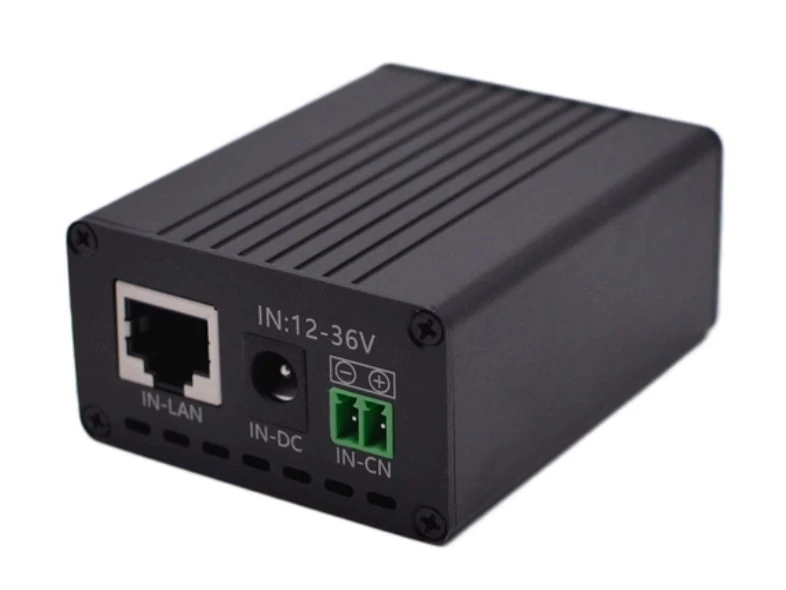
A solar battery may require a converter to power a PoE device. The Maxsol POE24V DC-to-PoE power converter accepts 12–36V DC and provides an adjustable 12–57V PoE output, Gigabit Ethernet and an LCD voltage display. Its documented continuous load for 12V-to-48V conversion is no more than 30W.
The documented conversion efficiency of up to 94% is a maximum value, not a guaranteed design efficiency across every input voltage and load. Use a conservative allowance in the energy budget.
IEEE powered-device detection or negotiation is not established by the approved information. Before connecting a camera, radio or other device, verify:
- Required PoE voltage
- Passive or standards-based PoE requirement
- Polarity and pinout
- Power demand, including startup and night mode
- Input-voltage range under battery charge and discharge
- Ethernet speed
- Connector arrangement
- Maximum continuous converter load
An incorrect passive PoE connection can damage equipment even when the voltage appears correct.
Plan mounting, cabling and protection
Outdoor reliability depends heavily on mechanical and electrical installation. A correctly sized panel and battery cannot compensate for water entering a connector, a loose radio mount or excessive voltage drop.
Separate component placement by function
Plan distinct positions for:
- Solar panel with minimal shading
- Cameras with the required field of view
- Directional radios with clear alignment
- Battery and controller enclosure
- Recorder or switch enclosure
- Cellular antenna, if used
- Isolation, overcurrent and surge protection
- Service loops and maintenance access
Avoid using the camera direction as the sole basis for panel orientation. The best camera view and the best solar window may be different, requiring separate mounts or a carefully designed structure.
Control cable length and voltage drop
Low-voltage DC systems can experience significant voltage drop over long cable runs. Calculate the drop using the conductor size, current, route length and minimum acceptable device voltage. Check performance at the lowest expected battery voltage and highest operating load.
Good outdoor cabling practice includes:
- UV-resistant cable or suitable conduit
- Weatherproof glands sized for each cable
- Drip loops before enclosure entries
- Downward-facing cable penetrations where practical
- Strain relief at poles and enclosures
- Separation of power and data where required
- Labelled cables, fuses and disconnects
- Sealed unused enclosure openings
- No exposed indoor-style connectors
For a broader enclosure and network layout checklist, see the outdoor PoE switch box, power, fibre and battery guide.
Design for weather, surge and maintenance
Mounting hardware must suit the expected wind, corrosion and vibration conditions. Panel frames, camera brackets and radio mounts should not shift during severe weather. Follow applicable structural and electrical practices, and use qualified personnel where earthing, lightning protection or elevated work is involved.
Provide appropriately rated overcurrent protection near energy sources. Review surge protection for PV, DC power, Ethernet and other copper paths entering or leaving an enclosure. Earthing, bonding and surge-device selection should be designed as one coordinated system rather than added independently at the end.
Keep batteries and electronics away from direct water entry, standing water and uncontrolled heat. Confirm that the enclosure’s ventilation strategy does not create a new path for insects, moisture or dust.
Commission night operation and outage recovery
Commissioning should prove the complete system, not just confirm that a daytime camera image is visible. Test cameras, recording, network access, power conversion, charging and automatic recovery under realistic operating conditions.
Complete a day-and-night functional test
At minimum, verify:
- Every camera has the intended view and useful subject scale.
- Focus remains acceptable after dark.
- Infrared illumination does not reflect from nearby walls, leaves, brackets or covers.
- Night-time camera consumption remains within the power budget.
- Recording timestamps are correct and consistent.
- Stored video can be found, exported and played.
- Wireless or cellular access works at the agreed quality.
- Panel charging and controller status are recorded.
- Enclosure temperature and cable entries show no immediate problems.
- Device labels match drawings and configuration records.
Testing across at least one complete day-and-night cycle is a practical commissioning baseline, not a product performance guarantee. Longer observation may be necessary where weather, shading or network conditions vary.
Simulate expected failures
A remote system must recover without requiring routine manual intervention. Test:
- Backhaul disconnected while local recording continues
- Backhaul restored and remote access recovered
- Camera or PoE output power-cycled
- Recorder restarted after power interruption
- Solar input isolated and restored
- Battery protection or low-voltage shutdown behaviour, using a controlled method
- System restart when adequate power returns
- Wireless endpoint reboot and reconnection
- Cellular modem restart, if installed
Do not deliberately deep-discharge a battery merely to prove autonomy. Controlled simulation or controller settings may provide safer evidence, depending on the equipment design.
Prepare acceptance evidence
The final acceptance pack should show what was installed and what was proven. Include:
- Site survey and approved design
- Camera schedule and final views
- Power-budget worksheet
- Current equipment datasheets
- Voltage, polarity and PoE compatibility checks
- Cable and protection schedule
- Panel, enclosure and equipment photographs
- Wireless alignment or cellular test records
- Day and night image samples
- Recording playback and export evidence
- Power interruption and recovery results
- Device settings and configuration backup
- Known limitations and maintenance actions
Acceptance criteria should be agreed before installation. Examples include required camera views, recording retention, remote-access function, outage behaviour and recovery sequence. Avoid vague requirements such as “clear video” or “strong signal” when a testable condition can be defined.
Common mistakes to avoid
The most frequent design errors are usually interface or planning problems rather than solar-panel problems:
- Sizing from camera quantity instead of measured watt-hours
- Ignoring higher camera consumption when infrared LEDs activate
- Treating nominal battery capacity as fully usable energy
- Assuming all PoE implementations use the same voltage and pinout
- Selecting a wireless link from the model’s range label alone
- Depending on cellular backhaul without local recording
- Surveying mobile signal only at ground level
- Failing to include recorders, modems and converters in the load
- Mounting the panel where future vegetation will shade it
- Omitting voltage-drop calculations
- Installing unsealed connectors inside an otherwise weatherproof box
- Testing only during daylight and normal grid or network conditions
- Failing to document recovery after a low-voltage shutdown
A successful remote CCTV deployment is therefore an integrated power, network, recording and mechanical project. As a next step, compare the linked Maxsol models with the required port count, continuous and peak load, backhaul distance, input and output voltage, environmental conditions, and management requirements. Confirm every interface against the current datasheets before procurement or installation.