SFP Uplink PoE Switch Guide for CCTV Fiber Networks
Learn how to select an SFP uplink PoE switch for CCTV: compare copper and fiber backhaul, plan topology, and verify module compatibility.
By Maxsol Team

An SFP uplink PoE switch for CCTV connects camera access switches to a central network through a pluggable fibre transceiver. It is a practical choice when cameras are installed in separate buildings, gatehouses, parking areas, warehouses or outdoor zones where a copper uplink is too short, difficult to protect, or unsuitable for the cable route.
The switch itself does not determine whether the fibre link will work. A reliable design depends on the complete path: the number of uplinks needed, network topology, fibre type and core count, installed connectors, SFP module pair, intended link speed, optical loss budget, PoE demand and recording traffic. Confirm these details before purchasing switches and modules.
What an SFP uplink does
An SFP uplink is a slot that accepts a Small Form-factor Pluggable (SFP) transceiver module. Instead of sending the network uplink through an RJ45 copper port, the switch uses the installed module to transmit Ethernet traffic over fibre optic cable.
In a CCTV network, PoE ports normally power and connect IP cameras, while the SFP uplink carries aggregated video traffic towards the NVR, server, core switch or network cabinet. The SFP module is usually selected separately because the right module depends on the fibre already installed and the distance to the next network point.
An SFP uplink can be useful for:
- Connecting a remote camera switch to the main security room
- Linking cameras across separate buildings within a compound
- Creating a backbone between floor, gate, perimeter and control-room cabinets
- Using existing fibre infrastructure instead of adding long copper runs
- Keeping a remote PoE switch close to its cameras while placing recording equipment centrally
- Reserving copper ports for local equipment rather than using them as inter-switch backhaul
It is important to separate two roles in the design:
- PoE access layer: Delivers data and electrical power to cameras over Ethernet cable.
- Fibre uplink or backhaul: Carries combined traffic from many cameras between network locations.
Fibre does not supply PoE to the far-end switch or cameras. Each remote cabinet still needs suitable local power for its PoE switch and connected devices.
Why the uplink requires planning
The uplink is shared by all cameras connected below it. A switch may have sufficient PoE ports and power budget but still require careful bandwidth planning if multiple high-bitrate cameras, recording streams, client viewing traffic or other network devices use the same uplink.
Work out the expected traffic at normal operation and consider higher-demand situations, such as multiple users viewing live video, cameras switching to higher bitrate during movement, or footage being retrieved from the NVR. Keep room for overhead and future cameras rather than sizing an uplink only for an ideal low-traffic condition.
Copper versus fibre backhaul
Copper Ethernet and fibre uplinks both have a place in CCTV. The better choice depends on route length, physical environment, existing cable pathways, electrical conditions, port needs and expansion plans.
| Consideration | Copper backhaul | Fibre backhaul through an SFP uplink |
|---|---|---|
| Connection medium | Twisted-pair Ethernet cable | Fibre cable plus SFP modules |
| Switch connection | RJ45 port | SFP slot with suitable transceiver |
| Typical use | Short links within the same building or cabinet area | Links between buildings, remote zones or longer cable routes |
| Electrical isolation | Conductive cable path | Fibre itself is non-conductive |
| Planning focus | Cable category, length, terminations and surge protection strategy | Fibre type, cores, connectors, module pair, polarity and optical budget |
| Future flexibility | May require replacing the cable or equipment for a different approach | Module choice can be changed where the SFP slot and network design support it |
Copper is often simpler for a nearby switch in the same rack or building. It can reduce installation steps because no transceiver modules or fibre termination are needed. However, Ethernet over copper has channel-length limits and may be less suitable for exposed outdoor runs or links between electrically separate structures.
Fibre is commonly considered for longer and more demanding backbone routes. It can also help avoid a conductive path between buildings. This does not remove the need for a proper overall protection and earthing design for powered equipment, enclosures and copper camera cables. Assess the site as a whole, especially where cables enter buildings or outdoor cabinets.
Do not select fibre solely because it is “better”. A copper uplink may be appropriate for a short, protected connection. Conversely, do not stretch a copper backhaul beyond its proper Ethernet channel design just to avoid fibre planning.
Count uplinks and plan topology
Start by drawing the CCTV network as physical locations rather than only counting cameras. Mark the control room, NVR location, camera groups, cabinets, buildings, gate areas and likely expansion zones. Then define how each access switch returns to the recording network.
Common CCTV fibre topologies
Star topology
Each remote PoE switch has its own fibre run back to a central aggregation switch or equipment room. This is easier to document and troubleshoot because each location has a dedicated path. It may require more fibre cores and central ports.
Daisy-chain topology
One remote switch uplinks to another before traffic reaches the core. This can reduce cable runs, but the upstream link and intermediate switch become shared dependencies. Traffic calculations and fault isolation become more important.
Ring topology
A ring can provide an alternative physical path only when the connected equipment and network design support the intended redundancy behaviour. Do not assume that plugging switches in a ring automatically creates resilience; it can also create loops and disruption without the correct controls.
Point-to-point building link
A fibre pair links one remote camera cabinet or small building directly to the main site network. This is often straightforward for an isolated camera cluster.
For every topology, answer these questions:
- How many remote switches need fibre uplinks today?
- Does each remote location need one path or two?
- How many SFP ports are required at the central switch?
- Is there a spare fibre path or spare SFP capacity for expansion?
- Which device is the aggregation point for NVR traffic?
- What happens to recording if an uplink or remote switch loses power?
- Will a future wireless bridge, access point, access-control controller or additional camera group share the same backhaul?
Avoid treating all ports as interchangeable
An SFP uplink slot is not the same as an RJ45 uplink port, even if both carry Ethernet. It needs an SFP module, compatible fibre and correct fibre termination. Also check the direction of the data path in the switch design. In most CCTV deployments, camera traffic is concentrated towards the uplink, so uplink speed and aggregation capacity deserve particular attention.
If an access switch offers only one SFP uplink, it may suit a simple point-to-point fibre connection. A model with two SFP uplinks can provide more layout choices, such as separate fibre directions or a fibre link plus an additional network connection, subject to the overall topology and configuration.
Confirm module, fibre and distance compatibility
The SFP module must match both the switch interface and the installed fibre link. This is the most important check in an SFP CCTV deployment, and it should be completed before hardware is finalised.
Confirm the following with the switch, fibre installer and module supplier:
-
SFP port speed and module speed
Verify the switch’s supported SFP speed and use modules intended for that interface. Do not assume a higher-speed module will operate at a lower speed. -
Fibre type
Identify whether the installed cable is single-mode or multimode. These require the correct class of optical module. The cable marking, as-built documentation or fibre contractor can help confirm this. -
Number of fibre cores available
Standard duplex links generally use two fibres: one transmit and one receive. Some designs use single-fibre bidirectional modules, which require a correctly matched complementary pair. Do not mix these approaches without a clear plan. -
Connector type and patching
Confirm the connector type at the patch panel, splice box and equipment end. Check whether the module connection and patch lead are appropriate for the installed hardware. -
Module pairing at both ends
The two ends of a fibre link must use compatible modules. For duplex links, transmit and receive paths must be correctly crossed. For bidirectional links, the paired wavelengths must be complementary. -
Link distance and optical loss budget
Measure or verify the actual route length, then account for splices, patch panels, connectors and any other losses. Select modules based on the full optical path, not distance alone. This article does not assign a distance rating because it varies by module and installed link conditions. -
Vendor and coding requirements
Some equipment has specific module acceptance or coding requirements. Confirm that the proposed SFP is accepted by the exact switch model before installation. -
Operating environment
For cabinets exposed to heat, dust, moisture or temperature variation, confirm that the module and enclosure arrangement are suitable for the site conditions.
A frequent mistake is ordering “SFP modules” without stating fibre type, connector, link architecture or distance. That description is incomplete. A usable procurement request should identify the switch model, required speed, fibre type, duplex or bidirectional design, connector arrangement, route length and number of module pairs.
Test the physical fibre link before commissioning cameras
A fibre link can appear correctly connected while still failing because of contamination, reversed polarity, excessive loss or an incorrect module pair. Follow the installation team’s test process, label both ends of every cable, and retain test records where these are part of the project handover requirement.
Once the Ethernet link is active, confirm stable connectivity before adding the full camera load. Then validate live view, recording, camera discovery and the expected video streams across the uplink.
Compare practical switch layouts
The appropriate layout depends on camera count, camera port speed needs, available power and how many fibre paths the cabinet requires. The following models should be assessed using their documented port layout and power figures, while module selection remains a separate compatibility task.
| Switch layout | Suitable planning scenario | Points to verify |
|---|---|---|
| 8 Gigabit PoE ports, 2 Gigabit SFP uplinks, 120W internal supply | Smaller camera groups where Gigabit PoE access ports and two fibre uplink slots suit the topology | Total PoE load, selected SFP modules, central switch ports, and whether two fibre paths are needed |
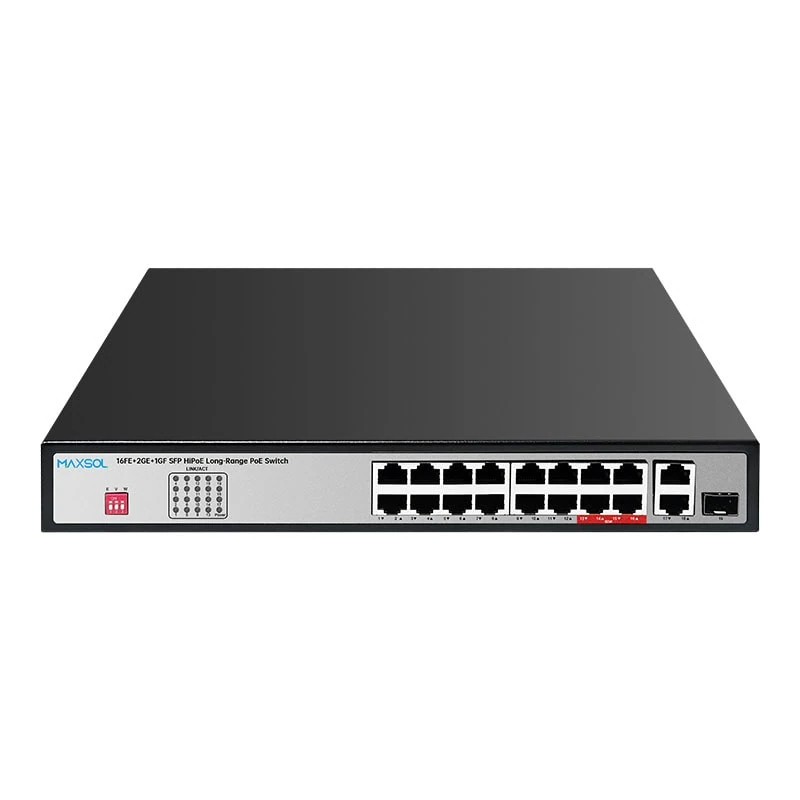
| 16 Fast Ethernet PoE ports, 2 Gigabit copper uplinks and 1 Gigabit SFP uplink, 200W budget | Mid-sized camera groups with a single fibre return and additional copper uplink options | Camera bandwidth, one-SFP topology limits, PoE budget and the intended use of copper uplinks |
| 24 Fast Ethernet PoE ports, 2 Gigabit copper uplinks and 1 Gigabit SFP uplink, 300W budget | Larger camera groups that need more Fast Ethernet PoE ports and one fibre uplink | Aggregated video traffic, total power demand, cabinet capacity and future expansion |
For a smaller fibre-connected camera cabinet, review the 8-port Gigabit PoE switch with 2 Gigabit SFP uplinks and 120W supply. It provides eight Gigabit PoE ports, two Gigabit SFP uplinks, IEEE 802.3af/at support up to 30W per port, VLAN, watchdog and Extend mode. Per-port capability is not a substitute for total-power calculation: the combined connected load must remain within the 120W internal supply.
Where the access design calls for 16 Fast Ethernet PoE camera ports and one Gigabit SFP return, compare the 16-port Fast Ethernet PoE switch with Gigabit SFP uplink and 200W budget. Its layout also includes two Gigabit copper uplinks. Decide in advance whether the fibre or copper uplink is the active backhaul, and avoid unintentionally creating a loop by connecting both paths without suitable network planning.
For a higher camera-port count, the 24-port Fast Ethernet PoE switch with Gigabit SFP uplink and 300W budget has 24 Fast Ethernet PoE ports, two Gigabit copper uplinks and one Gigabit SFP uplink. Check that the expected camera traffic, including peak recording and viewing behaviour, fits the intended aggregation design.
Calculate PoE power separately from fibre selection
SFP uplink planning does not replace PoE planning. List each camera’s stated maximum power draw, including any IR illumination, PTZ movement, heaters or other supported functions. Add the values, compare the result with the switch’s total power budget, and leave practical allowance for startup behaviour and future additions.
Also confirm the power source available at each remote cabinet. Fibre can carry data to the cabinet, but the switch still needs local electrical supply for PoE delivery.
Fibre deployment checklist
Use this checklist before approving an SFP uplink PoE switch for CCTV:
- Map every camera cluster, cabinet, building and NVR location.
- Choose the topology: star, point-to-point, daisy chain or a properly designed resilient layout.
- Count SFP ports required at both remote and central ends.
- Allow for spare ports or fibres where future expansion is expected.
- Confirm the access-port count and required camera link speed.
- Calculate total camera PoE demand against the switch power budget.
- Identify the installed fibre as single-mode or multimode.
- Confirm whether the link uses duplex fibre or bidirectional single-fibre modules.
- Record connector types, patch-panel arrangement and fibre core availability.
- Verify SFP speed, module pairing and acceptance for the exact switch model.
- Validate actual route length and complete optical loss budget with the fibre installer.
- Plan cable labelling, cabinet power, grounding and protection arrangements.
- Test fibre continuity and link operation before full camera commissioning.
- Check camera video traffic, recording and live viewing under the expected operating load.
- Document module types, fibre routes, port assignments and spare capacity for maintenance.
Common mistakes to avoid
Choosing the switch before checking the fibre.
An SFP slot does not reveal whether the site has single-mode or multimode cable, enough cores, suitable connectors or an acceptable optical path.
Counting cameras but not their power.
A 16-port or 24-port switch can physically connect many cameras, but the total PoE budget must support the planned devices.
Using a single uplink without traffic review.
One Gigabit uplink can be appropriate for many applications, but its suitability depends on actual camera bitrates, recording patterns and concurrent use.
Creating an unintended loop.
Connecting both copper and fibre between the same network areas without an intentional design can cause unstable operation.
Ignoring the central side of the link.
Every remote fibre uplink needs a compatible module, a suitable port and sufficient capacity at the core or aggregation end.
Leaving no room for change.
Spare fibre cores, SFP ports, cabinet space and power allowance can simplify later expansion when additional cameras are added.
A well-specified CCTV fibre backbone starts with the cable path and traffic design, then matches the PoE switch layout and SFP modules to that plan. Compare the linked Maxsol models against your required port count, PoE load, fibre distance, environment, uplink topology and management requirements before making a final selection.